Hi all today we shall see about how to use stackedwidget in QT.
You might have confusion that how to handle mutiple views in QT?, for example you are in an inbox widget and you will switch to message widget. How to handle this sort of situations? you may think that hiding the inbox widget and going to message widget or delete the inbox widget and recreate it after coming back from message widget.But this could be a temporary solution not the better approach,the better approch is to use Qt Stackedwidget.
The concept is very simple, when you are in one widget and you will switch to another widget just push the current widget into stack and proceed to next widget, when you are coming back to the previous widget just delete the current widget and pop up the previous widget from the stack.
Most of Qt apps will have a Mainwindow and formed with multiple widgets, Mainwindow has menubar,when you switch to any widget just delete the current menu actions form window and load it with the new actions from widget. so if you do like this then, you always have a single class which is derived from "Qmainwindow" thought the application.
In mainwindow itself, you need to handle all the possibalities like when setting back menu,setting exit or is exit required throught application and many other things depending on your requirements.
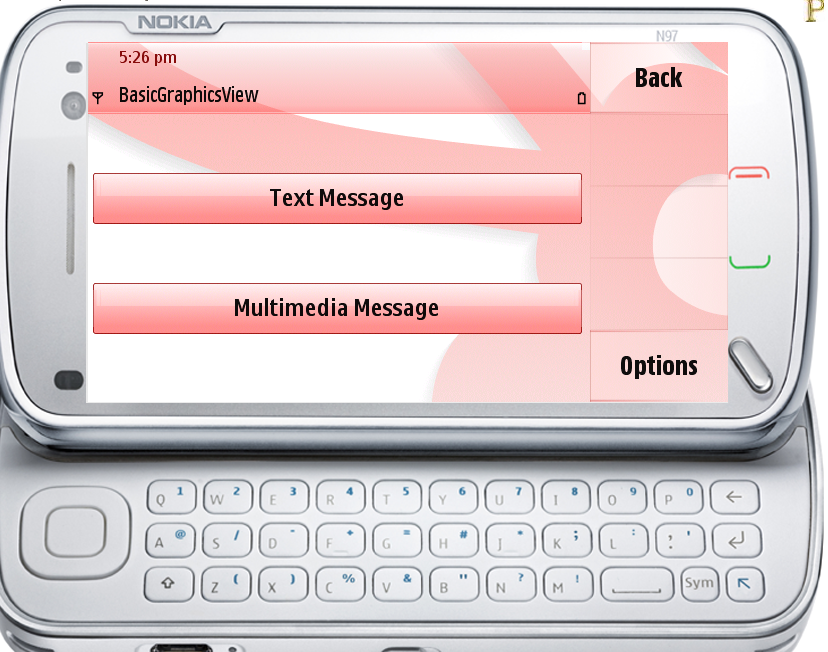
Here is the simple example i have created which demonstrate how to use stackedwidget in QT.
in this i would like to explain few mainwindow functions which may be usefull.
"Qt_Stackwidget::activeWidgetChanged(int index)"--->; This gets called when the new widget is created with index of it, so clear the window menu bar and load it with new menus assosiated with new widget
"Qt_Stackwidget::changeCBA(QBaseWidget* current)"--->; This is for adding the back or exit based on the widget type, for example in first widget you should keep exit or else back would be preffered.
"Qt_Stackwidget::activatePerviousView()"--->;This is for activating the previous view by deleting the current one when you hit back menu.
Here is the simple source code, i have created widgets & view switching logic in the single file itself ,you can split it to multiple and use it accordingly.
Qt_Stackwidget.cpp
Qt_Stackwidget.h



You might have confusion that how to handle mutiple views in QT?, for example you are in an inbox widget and you will switch to message widget. How to handle this sort of situations? you may think that hiding the inbox widget and going to message widget or delete the inbox widget and recreate it after coming back from message widget.But this could be a temporary solution not the better approach,the better approch is to use Qt Stackedwidget.
The concept is very simple, when you are in one widget and you will switch to another widget just push the current widget into stack and proceed to next widget, when you are coming back to the previous widget just delete the current widget and pop up the previous widget from the stack.
Most of Qt apps will have a Mainwindow and formed with multiple widgets, Mainwindow has menubar,when you switch to any widget just delete the current menu actions form window and load it with the new actions from widget. so if you do like this then, you always have a single class which is derived from "Qmainwindow" thought the application.
In mainwindow itself, you need to handle all the possibalities like when setting back menu,setting exit or is exit required throught application and many other things depending on your requirements.
Here is the simple example i have created which demonstrate how to use stackedwidget in QT.
in this i would like to explain few mainwindow functions which may be usefull.
"Qt_Stackwidget::activeWidgetChanged(int index)"--->; This gets called when the new widget is created with index of it, so clear the window menu bar and load it with new menus assosiated with new widget
"Qt_Stackwidget::changeCBA(QBaseWidget* current)"--->; This is for adding the back or exit based on the widget type, for example in first widget you should keep exit or else back would be preffered.
"Qt_Stackwidget::activatePerviousView()"--->;This is for activating the previous view by deleting the current one when you hit back menu.
Here is the simple source code, i have created widgets & view switching logic in the single file itself ,you can split it to multiple and use it accordingly.
Qt_Stackwidget.cpp
//Qt-articles.blogspot.com
#include "Qt_Stackwidget.h"

Qt_Stackwidget::Qt_Stackwidget(QWidget *parent)
    : QMainWindow(parent)
{
    //ui.setupUi(this);
    back = NULL;
    stack = new QStackedWidget();
    QObject::connect(stack, SIGNAL(currentChanged(int)),this, SLOT(activeWidgetChanged(int)));
    stack->addWidget(new Homewidget(stack));
    setCentralWidget(stack);
}

Qt_Stackwidget::~Qt_Stackwidget()
{

}
//when new widget is inserted to stack
void Qt_Stackwidget::activeWidgetChanged(int index)
    {
    // Current widget changed, we use menubar of the new widget
    QBaseWidget* current = static_cast<QBaseWidget*>(stack->widget(index));
    //changeCBA(current);
    if (current)
        {
        // NOTE: need to set focus for the active widget.
        // Enviroment search CBA buttons from the active widget and use these.
        // CBA buttons for the active focused widget is set in changeCBA()
        current->setFocus();
        // Update menubar of the QMainWindow
        QMenuBar* menubar = this->menuBar();
        menubar->clear();
        for (int i=0;i<current->GetMenuBar()->actions().count();i++)
            {
            QAction *act = current->GetMenuBar()->actions()[i];

            menubar->addAction(act);
            }
        createBaseMenu();
        }
    // Set correct CBA buttons for the active widget
    changeCBA(current);
    }
//Qt-articles.blogspot.com
void Qt_Stackwidget::createBaseMenu()
    {
    // All widgets in QStackedWidget have this exit menu item
    menuBar()->addAction("Exit",this,SLOT(close()));
    }

void Qt_Stackwidget::changeCBA(QBaseWidget* current)
    {
    if (current)
        {
        QString classname = current->metaObject()->className();
        if(back != NULL)
           {
                  delete back;
                 back = NULL;
           }
        if (classname == "Firstwidget" || classname == "Secwidget" || classname == "Thiredwidget")
            {
            // Change Back left softkey for QMyWidget2 and QMyWidget3
            createOptionsBackCBA(current);
            }
        else
            {
            // rest have Exit left softkey
            createOptionsExitCBA(current);
            }
        }
    }

void Qt_Stackwidget::createOptionsExitCBA(QWidget* current)
    {

    back = new QAction("Exit", this);
    back->setSoftKeyRole(QAction::NegativeSoftKey);
    QObject::connect(back, SIGNAL(triggered()), this, SLOT(close()));
    this->addAction(back);

    }
//Qt-articles.blogspot.com
void Qt_Stackwidget::createOptionsBackCBA(QBaseWidget* current)
    {
    // Create exit right CBA
    back = new QAction("Back", this);
    back->setSoftKeyRole(QAction::NegativeSoftKey);
    QObject::connect(back, SIGNAL(triggered()), this, SLOT(activatePerviousView()));
    this->addAction(back);
    }

int Qt_Stackwidget::activatePerviousView()
    {
    int ret = -1;
    QString currentName = stack->currentWidget()->metaObject()->className();
    QString previous;

    int count = stack->count();
    for (int i=stack->count()-1;i>=0;i--)
        {
        QWidget* w = stack->widget(i);
        if (w->metaObject()->className()==currentName)
            {

                {
                i--;
                previous = stack->widget(i)->metaObject()->className();
                ret = 0;
                stack->setCurrentWidget(stack->widget(i));
                stack->removeWidget(w);
                delete w;
                // Activate prevous widget
                //activateWidget(previous);
                }
            break;
            }
        }
   return ret;
    }

Homewidget::Homewidget(QStackedWidget* stackedWidget,QWidget *parent)
    : QBaseWidget(parent)
{
    //Create 3 Buttonss
    BaseStackwidget = stackedWidget;
    widget1 = new QPushButton("Create message");
     QObject::connect(widget1,SIGNAL(clicked()),this, SLOT(CreateFirstwidget()));
    widget2 = new QPushButton("Inbox");
     QObject::connect(widget2,SIGNAL(clicked()),this, SLOT(CreateSecwidget()));
    widget3 = new QPushButton("Outbox");
     QObject::connect(widget3,SIGNAL(clicked()),this, SLOT(CreateThiredwidget()));

    createMenus();
    //Add the widget to layouts
    layout = new QVBoxLayout();
    layout->addWidget(widget1);
    layout->addWidget(widget2);
    layout->addWidget(widget3);
    setLayout(layout);
}

Homewidget::~Homewidget()
{

}
//Create the first widget
void Homewidget::CreateFirstwidget()
    {
    Firstwidget *first= new Firstwidget(BaseStackwidget);
    BaseStackwidget->addWidget(first);
    BaseStackwidget->setCurrentWidget(first);
    }
//Create the sec widget
void Homewidget::CreateSecwidget()
    {

    Secwidget *sec= new Secwidget(BaseStackwidget);
    BaseStackwidget->addWidget(sec);
    BaseStackwidget->setCurrentWidget(sec);
    }
//Create the thired widget
void Homewidget::CreateThiredwidget()
    {
    Thiredwidget *thiredwid = new Thiredwidget(BaseStackwidget);
    BaseStackwidget->addWidget(thiredwid);
    BaseStackwidget->setCurrentWidget(thiredwid);
    }

QMenuBar* Homewidget::GetMenuBar() const
    {
      return menuBar;
    }
//Qt-articles.blogspot.com
void Homewidget::createMenus()
    {
    // Create menubar for this widget
    // We sets these menu items into into QMainWindow menu when this widget is active
    menuBar = new QMenuBar();

    FirstwidgetAction = new QAction("Create message",menuBar);
    menuBar->addAction(FirstwidgetAction);
    connect(FirstwidgetAction, SIGNAL(triggered()),this, SLOT(CreateFirstwidget()));

    SecwidgetAction = new QAction("Inbox",menuBar);
    menuBar->addAction(SecwidgetAction);
    connect(SecwidgetAction, SIGNAL(triggered()),this, SLOT(CreateSecwidget()));

    ThiredwidgetAction = new QAction("Outbox",menuBar);
    menuBar->addAction(ThiredwidgetAction);
    connect(ThiredwidgetAction, SIGNAL(triggered()),this, SLOT(CreateThiredwidget()));
    }

Firstwidget::Firstwidget(QStackedWidget* stackedWidget,QWidget *parent)
    :QBaseWidget(parent)
{
    BaseStackwidget = stackedWidget;
    widget2 = new QPushButton("Text Message");
    bool val = QObject::connect(widget2,SIGNAL(clicked()),this, SLOT(CreateSecwidget()));
    widget3 = new QPushButton("Multimedia Message");
    QObject::connect(widget3,SIGNAL(clicked()),this, SLOT(CreateThiredwidget()));

    createMenus();

    layout = new QVBoxLayout();
    layout->addWidget(widget2);
    layout->addWidget(widget3);

    setLayout(layout);
}

void Firstwidget::CreateSecwidget()
    {
    Secwidget *sec= new Secwidget(BaseStackwidget);
    BaseStackwidget->addWidget(sec);
    BaseStackwidget->setCurrentWidget(sec);
    }
//Qt-articles.blogspot.com
void Firstwidget::CreateThiredwidget()
    {
    Thiredwidget *thired= new Thiredwidget(BaseStackwidget);
    BaseStackwidget->addWidget(thired);
    BaseStackwidget->setCurrentWidget(thired);
    }

void Firstwidget::createMenus()
{
    menuBar = new QMenuBar();

    SecwidgetAction = new QAction("Text Message",menuBar);
    menuBar->addAction(SecwidgetAction);
    connect(SecwidgetAction, SIGNAL(triggered()),this, SLOT(CreateSecwidget()));

    ThiredwidgetAction = new QAction("Multimedia Message",menuBar);
    menuBar->addAction(ThiredwidgetAction);
    connect(ThiredwidgetAction, SIGNAL(triggered()),this, SLOT(CreateThiredwidget()));
}

QMenuBar* Firstwidget::GetMenuBar() const
{
    return menuBar;
}

Secwidget::Secwidget(QStackedWidget* stackedWidget,QWidget *parent)
    :QBaseWidget(parent)
{
    BaseStackwidget = stackedWidget;
    widget3 = new QLabel("You are in the last screen, plese press back to go to previous screen");

    bool val = QObject::connect(widget3,SIGNAL(clicked()),this, SLOT(CreateThiredwidget()));

    createMenus();
    layout = new QVBoxLayout();
    layout->addWidget(widget3);
    setLayout(layout);

}
//Qt-articles.blogspot.com
void Secwidget::CreateThiredwidget()
{
    Thiredwidget *thired= new Thiredwidget(BaseStackwidget);
    BaseStackwidget->addWidget(thired);
    BaseStackwidget->setCurrentWidget(thired);
  //add the code to create thired widget, and with menu exit and right back
}

void Secwidget::createMenus()
{
    menuBar = new QMenuBar();
        //connect(menuBar, SIGNAL(triggered()),this, SLOT(CreateThiredwidget()));
    //ThiredwidgetAction = new QAction("Thired Widget",menuBar);
    //menuBar->addAction(ThiredwidgetAction);

}

QMenuBar* Secwidget::GetMenuBar() const
{
    return menuBar;
}

Thiredwidget::Thiredwidget(QStackedWidget* stackedWidget,QWidget *parent)
    :QBaseWidget(parent)
{
    BaseStackwidget = stackedWidget;
    thiredwidgetLabel = new QLabel("You are in the last screen, plese press back to go to previous screen");
    createMenus();
    layout = new QVBoxLayout();
    layout->addWidget(thiredwidgetLabel);
    setLayout(layout);
}

void Thiredwidget::createMenus()
{
    menuBar = new QMenuBar();
    //connect(menuAction2, SIGNAL(triggered()),this, SLOT(createWidget2()));
}

QMenuBar* Thiredwidget::GetMenuBar() const
{
    return menuBar;
}
Qt_Stackwidget.h
//Qt-articles.blogspot.com

#include <QtGui/QMainWindow>
#include "ui_Qt_Stackwidget.h"
#include <QtGui>

class QBaseWidget;

class Qt_Stackwidget : public QMainWindow
{
    Q_OBJECT

public:
    Qt_Stackwidget(QWidget *parent = 0);
    ~Qt_Stackwidget();
    void createBaseMenu();
    void changeCBA(QBaseWidget* current);
    void createOptionsBackCBA(QBaseWidget* current);
    void createOptionsExitCBA(QWidget* current);
    QAction* back;

    public slots:
    int activatePerviousView();


public:
    Ui::Qt_Stackwidget ui;
    QStackedWidget *stack;

private slots:
    void activeWidgetChanged(int index);
};

class QBaseWidget : public QWidget
    {
    Q_OBJECT

    public:
        QBaseWidget(QWidget *parent = 0)
            {

            }
        virtual ~QBaseWidget()
            {

            }

    public:

        // Returns widget menu
        virtual QMenuBar* GetMenuBar() const=0;

        // Exit from the app
    protected:
        // Widget own menubar
        QMenuBar*           menuBar;

        // Pointer to QStackedWidget where all views exists
        QStackedWidget*     BaseStackwidget;
    };

class Homewidget : public QBaseWidget
    {
     Q_OBJECT

    public:
     Homewidget(QStackedWidget* stackedWidget,QWidget *parent = 0);
        ~Homewidget();

        QMenuBar* GetMenuBar() const;
        void createMenus();


   public slots:
        void CreateFirstwidget();
        void CreateSecwidget();
        void CreateThiredwidget();

    private :
        QMenuBar *menuBar;
        QPushButton *widget1;
        QPushButton *widget2;
        QPushButton *widget3;
        QVBoxLayout *layout;

        QAction *FirstwidgetAction;
        QAction *SecwidgetAction;
        QAction *ThiredwidgetAction;


    };
//First widget class
class Firstwidget : public QBaseWidget
    {
     Q_OBJECT

    public:
     Firstwidget(QStackedWidget* stackedWidget,QWidget *parent = 0);
        ~Firstwidget()
            {

            }

        QMenuBar* GetMenuBar() const;
        void createMenus();

   public slots:
        void CreateSecwidget();
        void CreateThiredwidget();

    private :
        QMenuBar *menuBar;

        QPushButton *widget2;
        QPushButton *widget3;
        QVBoxLayout *layout;

        QAction *SecwidgetAction;
        QAction *ThiredwidgetAction;

    };
//Second widget class
class Secwidget : public QBaseWidget
    {
     Q_OBJECT

    public:
     Secwidget(QStackedWidget* stackedWidget,QWidget *parent = 0);
        ~Secwidget()
            {

            }

        QMenuBar* GetMenuBar() const;
        void createMenus();

   public slots:
        //void CreateSecwidget();
        void CreateThiredwidget();

    private :
        QMenuBar *menuBar;

        QLabel *widget3;
        QVBoxLayout *layout;
        QLabel *thiredwidgetlabel;

        QAction *ThiredwidgetAction;

    };

class Thiredwidget : public QBaseWidget
    {
     Q_OBJECT

    public:
     Thiredwidget(QStackedWidget* stackedWidget,QWidget *parent = 0);
        ~Thiredwidget()
            {

            }
        QMenuBar* GetMenuBar() const;
        void createMenus();

    private :
        QMenuBar *menuBar;
        QVBoxLayout *layout;
        QLabel *thiredwidgetLabel;
    };
#endif // QT_STACKWIDGET_H
Some of the screenshots of output.